Nextcloud Talk vs Microsoft Teams: Which Collaboration Tool Fits Your Team?
5 min read · 14.09.2026
Our Blog / nextcloud-vs-pcloud-which-cloud-storage-is-better
← Back to overview
Cloud storage solutions are no longer limited to simply storing files online. Many now offer features for file synchronization, sharing, collaboration, and data management, making it important to choose a platform that aligns with your needs. Nextcloud and pCloud are two popular options, but they take different approaches to delivering cloud storage services.
In this article, we compare Nextcloud and pCloud across key areas, including privacy, security, file management, user experience, collaboration features, and costs to help you determine which solution is better suited to your requirements.
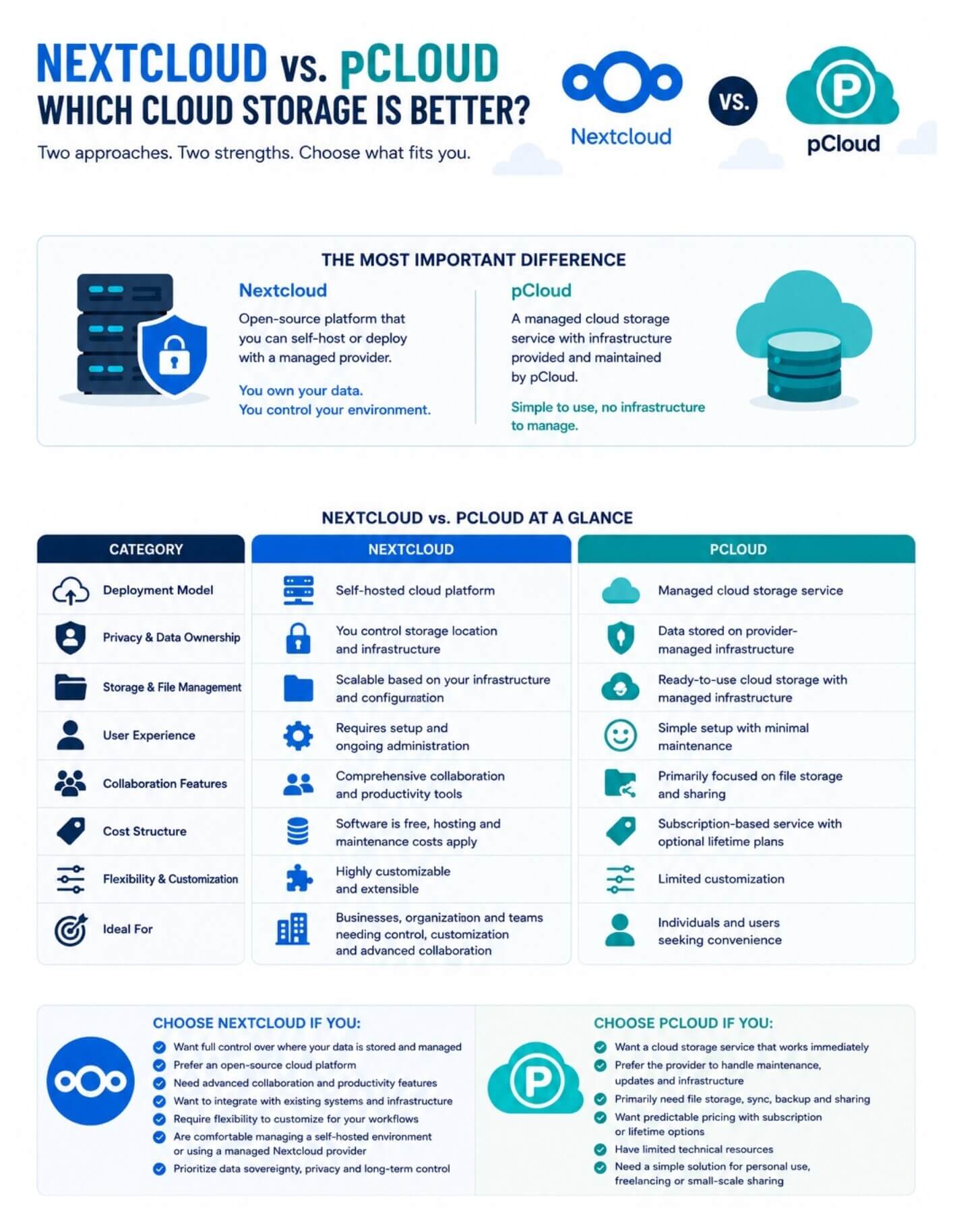
Nextcloud and pCloud both provide cloud storage, but they serve different needs. Nextcloud is an open-source platform that can be self-hosted or deployed via a managed provider, making it better suited for users who need greater control over data, customization, and collaboration. pCloud is a managed cloud storage service designed for simplicity, offering file storage, synchronization, sharing, and optional client-side encryption without requiring infrastructure management.
Although Nextcloud and pCloud are both used for cloud storage, they are built on different models.
Nextcloud is an open-source cloud platform that can be deployed on a private server, NAS device, virtual private server (VPS), or through a managed Nextcloud hosting provider. It allows users to create their own cloud environment for storing, syncing, and sharing files while also supporting additional collaboration and productivity tools.
pCloud is a commercial cloud storage service that provides storage infrastructure as part of a subscription. Users can upload, sync, access, and share files through pCloud's managed platform without deploying or maintaining their own server.
In simple terms, Nextcloud is software that can be hosted and managed by the user, while pCloud is a cloud storage service managed by the provider.
Before diving into the detailed comparison, it helps to understand how Nextcloud and pCloud differ across the key areas covered in this article. The table below provides a high-level overview of their deployment models, privacy approach, user experience, collaboration capabilities, costs, and ideal use cases.
Nextcloud gives users direct control over where their data is stored and how the platform is secured. Because it can be self-hosted on a private server, NAS device, or preferred hosting provider, organizations can choose the infrastructure that meets their privacy, compliance, and security requirements. Nextcloud also supports server-side encryption, granular access controls, multi-factor authentication, and end-to-end encryption for selected folders. However, the effectiveness of these measures ultimately depends on how the platform is configured and maintained.
pCloud takes a managed approach by handling the infrastructure, security updates, and storage environment on behalf of users. The service protects data both in transit and at rest and offers optional client-side encryption through pCloud Encryption, allowing files in encrypted folders to remain inaccessible even to the provider.
While this approach simplifies security management, users have less control over the underlying infrastructure and the location of data. For organizations or individuals prioritizing data sovereignty and deployment flexibility, Nextcloud offers greater control, whereas pCloud offers a more convenient security model with fewer administrative responsibilities.
Nextcloud provides file storage, synchronization, and sharing capabilities that can be scaled according to the storage infrastructure behind the deployment. Users can sync files across desktop and mobile devices, share content internally or externally, manage permissions, and integrate external storage sources such as network drives and object storage services. Because storage capacity depends on the hosting environment, organizations can expand resources as their requirements grow rather than being limited to predefined storage plans.
pCloud focuses on delivering a ready-to-use file management experience with built-in synchronization, file sharing, version history, and file recovery tools. Its desktop applications create a virtual drive that lets users access cloud-stored files without consuming local disk space.
Mobile apps also provide automatic media backup and cross-device file access. For most personal users, pCloud offers a simpler storage experience, but Nextcloud provides greater flexibility for organizations that need control over storage architecture, integrations, and long-term scalability.
Nextcloud offers a modern web interface and applications for desktop and mobile platforms, but the overall experience depends on how the platform is deployed and managed. Initial setup, software updates, storage management, backups, and performance optimization are typically handled by the user or administrator. While managed Nextcloud hosting services can reduce this complexity, organizations that self-host should be prepared to dedicate time and technical resources to ongoing administration.
pCloud is designed to minimize setup and maintenance requirements. Users can create an account, install the applications, and begin storing files within minutes without managing servers, updates, or infrastructure.
The platform maintains a consistent experience across devices and requires little technical knowledge beyond basic file management. For users who prioritize simplicity and minimal administration, pCloud offers a more accessible experience, while Nextcloud appeals to those willing to trade convenience for greater control and customization.
Nextcloud extends beyond cloud storage by providing a broader collaboration platform that includes document editing, shared workspaces, calendars, contacts, task management, video conferencing, and team communication tools. Through integrations such as Nextcloud Office, organizations can collaborate on documents within the same environment used for file storage. This makes Nextcloud a practical option for businesses, educational institutions, and teams looking to consolidate multiple productivity tools under a single platform.
pCloud includes file sharing and collaboration features that support everyday teamwork, such as shared folders, file links, and user access management. However, its primary focus remains cloud storage rather than serving as a comprehensive productivity ecosystem. Users seeking a straightforward solution for storing and sharing files may find pCloud sufficient. Organizations that require integrated collaboration and workflow capabilities are likely to benefit more from Nextcloud's broader feature set.
Nextcloud is free and open-source software, but running it incurs infrastructure costs that vary by deployment model. Self-hosted installations may require expenses for servers, storage, backups, domains, and ongoing maintenance, while managed Nextcloud providers typically charge recurring fees based on storage capacity and service levels. As a result, the total cost of ownership depends largely on the scale of deployment and the resources required to support it.
pCloud follows a more predictable pricing model through subscription plans and lifetime storage options. Users pay for storage capacity without worrying about server hardware, maintenance, or infrastructure management.
For individuals and small teams, this often makes budgeting easier and reduces operational overhead. While pCloud may have a lower barrier to entry, larger organizations with existing infrastructure may find that a well-managed Nextcloud deployment provides greater long-term value and flexibility.
Neither Nextcloud nor pCloud is universally better; the right choice depends on your priorities. Nextcloud is better suited for users and organizations that want greater control over their data, infrastructure, and collaboration environment. Meanwhile, pCloud is designed for those who prefer a managed cloud storage service with minimal setup and maintenance.
If privacy, customization, and long-term flexibility are your primary concerns, Nextcloud is likely the stronger option. If convenience, simplicity, and ease of use matter most, pCloud may be the better fit. Ultimately, understanding your storage, collaboration, and management requirements is the key to choosing the right platform.
5 min read · 14.09.2026
5 min read · 18.08.2026
9 min read · 07.08.2026
Hosted in
Germany
4.3on G2