Best OneDrive Alternatives for Businesses in 2026
8 min read · 29.09.2026
Our Blog / how-to-add-external-users-in-nextcloud-for-secure-collaboration
← Back to overview
Not everyone who needs access to your files should have a full account on your Nextcloud instance. Clients need access to deliverables, freelancers need shared folders, and partners often collaborate on the same files over weeks or months. These are the everyday collaboration scenarios, and none of them requires giving someone the keys to your entire cloud.
That's where external sharing comes in. Nextcloud gives you several ways to share folders and files with people outside your organization, without creating full user accounts or compromising your data privacy.
We explain how to add external users in Nextcloud, how to share folders securely with people who don't have an account, and how to manage their permissions so you stay in control.
If you need to add someone as a full internal user instead, that setup is explained in How to Add a User to Nextcloud.
External users are people who access specific files or folders on your Nextcloud instance without being registered as full users. They don't get a dashboard, they don't see your apps, and they have zero admin-level access.
In simple terms, they only see what you decide to share with them. Their visibility is actually limited to what you have explicitly shared.
Nextcloud external sharing typically works through two methods. The first is through secure share links, where you generate a URL that points to a specific file or folder. The second is through email-based invitations, where Nextcloud sends an access notification directly to someone's email address.
Neither method requires the external person to have a Nextcloud account. They don't need to install anything or create a login. They just need to open the link, enter a password if one is set, and access the content you shared.
This setup ensures your user directory stays limited to actual team members, your storage allocations remain predictable, and your admin panel doesn't fill up with accounts for people who only needed to look at one folder.
For organizations that deal with sensitive data or operate under GDPR requirements, this separation between internal and external access is more than a convenience. It is a compliance decision.
This is the most common requirement most teams have. You have a project folder, a collection of client files, or a batch of assets that someone outside your organization needs to see or contribute to. Nextcloud gives you two reliable approaches to do this, depending on how much control you need.
Public links are the quickest path to Nextcloud external sharing. Just a link that grants access to a specific folder without requiring an account.
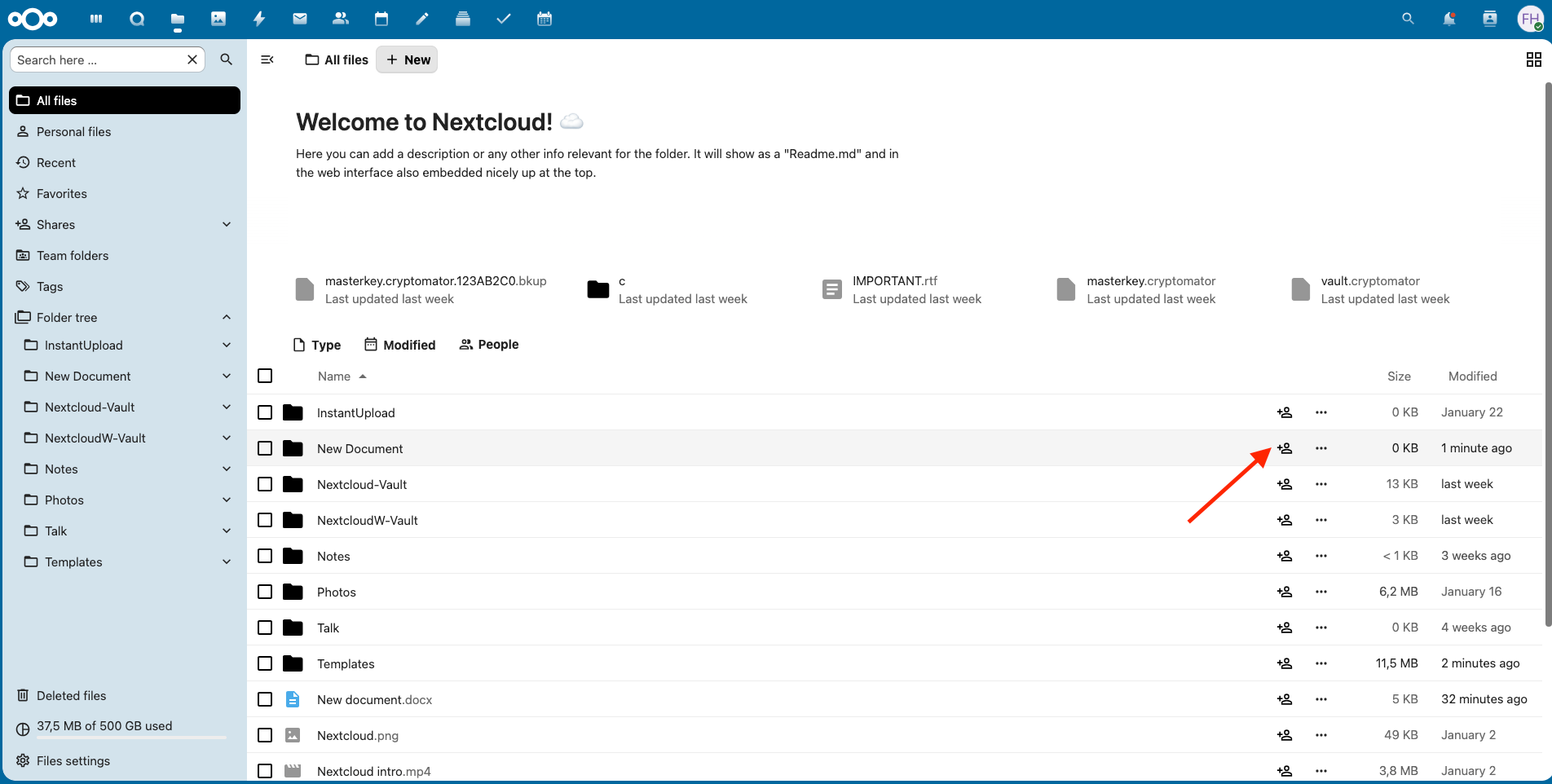
To share a folder using a public link, open the folder you want to share in Nextcloud and click the share icon.
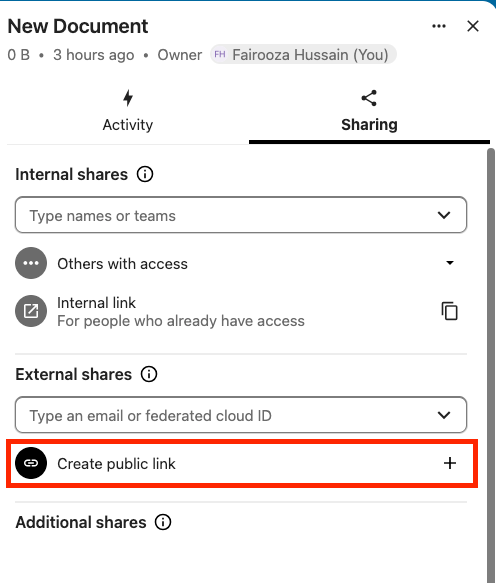
From the sharing panel, create a public share link and choose the permission level that fits the situation.
Nextcloud allows you to choose between:
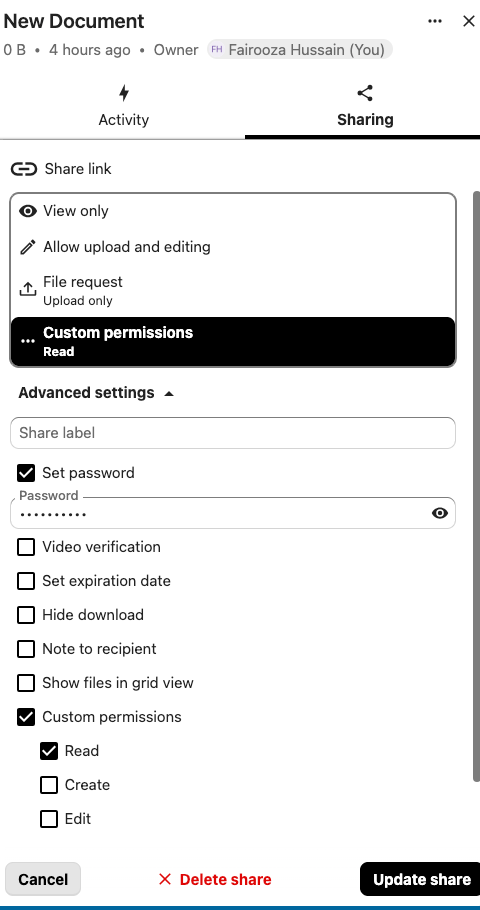
One thing we always recommend is that you do not leave public links unprotected. Always protect the link with a password and set an expiration date that matches the project timeline.
Public links work well for one-off file exchanges, document collection, or short review cycles. But for anything longer term, they get harder to track and manage. That is where email-based sharing becomes the better option.
When you need more control over who is accessing what, email-based sharing is the better option. It ties the share to a specific person rather than a link, which makes it easier to track and revoke later.
For that, open the folder you want to share, click the share icon, and enter the external user's email address under external shares.
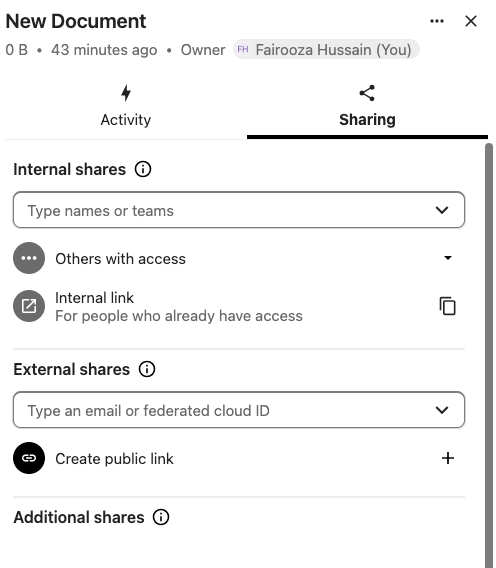
Choose the permission level, send the invitation, and you are done.
The recipient gets a secure email with access instructions. They log in and see only the folder you shared with them. Nothing else in your Nextcloud is visible to them.
For client collaborations, freelancer handoffs, or any situation where access needs to be traceable, email-based sharing is usually the better choice.
This process works the same whether you self-host Nextcloud or use a managed service. With a CloudBased Backup managed plan, we handle the server infrastructure, security patching, and backups, so your only job is managing shares and permissions from the Nextcloud interface.
If your team accesses Nextcloud from multiple devices, our setup guides for macOS, Android, and iPhone walk you through the full sync setup, so your shared folders stay up to date everywhere.
This is where teams often get confused, so here is the clear breakdown.
External users, shared through links or email invitations, are the right choice when someone only needs access to specific files or folders, when the collaboration is temporary or project-based, and when you want to avoid the overhead of creating and managing another account.
On the other hand, full Nextcloud users are the right choice when the person is part of your team or a long-term collaborator who needs their own storage space, calendar, email, contacts, or access to apps like Talk, Deck, Notes, or Tasks.
The rule is simple. If someone needs one folder, give them external access. If they need the Nextcloud ecosystem, give them a full account.
Nextcloud does not use separate guest accounts. Instead, you give external access by sharing a file or folder through a public link or by sending an email invitation. The person you share with sees only that specific file or folder, nothing else in your Nextcloud is visible to them.
Yes. You can share the same folder with as many external users as you need, and each one can have different permissions. One person might get view-only access while another can edit. You can also set separate passwords and expiration dates for each share, so every external user only gets exactly the access they need for exactly as long as they need it.
Yes, as long as it is set up correctly. Nextcloud lets you protect shared links with passwords, set expiration dates, control exactly what external users can do, and track who accessed what. That covers the application side. When Nextcloud is hosted in a managed environment, regular security updates and server maintenance further reduce risk.
8 min read · 29.09.2026
9 min read · 22.09.2026
5 min read · 14.09.2026
Hosted in
Germany
4.3on G2